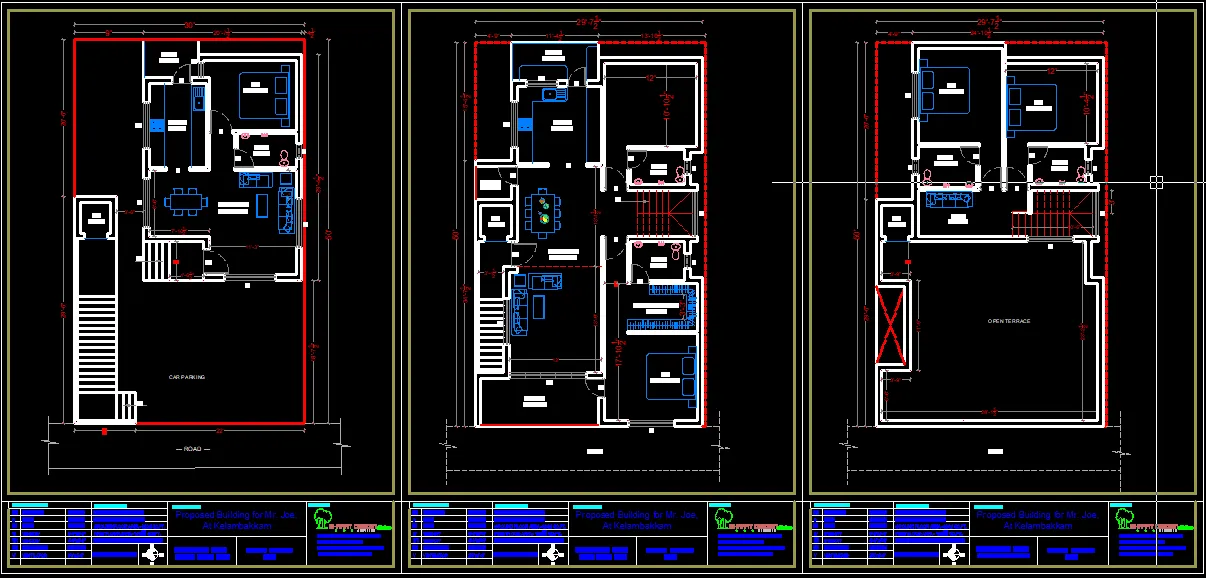
Scheme Drawing :
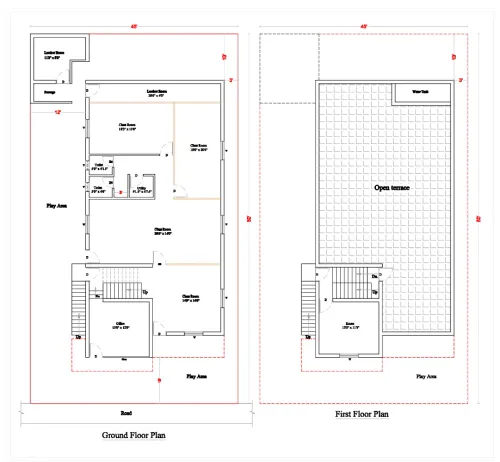
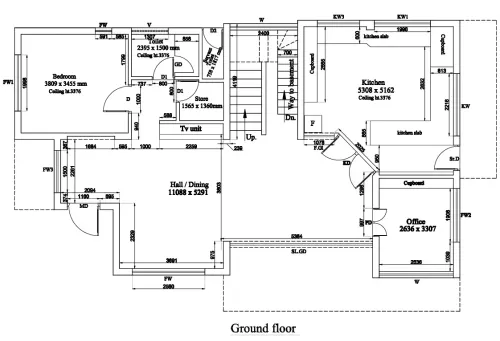
A scheme drawing plan typically refers to a simplified, conceptual layout or design used to represent the arrangement of elements within a specific project. It’s often used in architecture, engineering, and construction to give a high-level overview of how spaces, systems, or components will be organized or connected. Below are some general examples of where and how scheme drawing plans are used:
Types of Scheme Drawing Plans:
Architectural Scheme Drawing:
Purpose: Used for planning the layout of rooms, floors, and spaces in a building.
Details Included:
Room dimensions
Placement of walls, windows, doors, and other major structural components
Basic furniture or equipment layout
Example: A floor plan for a house, office space, or retail environment showing how rooms or spaces are arranged.
Electrical Scheme Drawing:
Purpose: Represents the layout of electrical systems such as power distribution, lighting, and circuit wiring.
Details Included:
Locations of outlets, switches, light fixtures
Power supply and circuit paths
Example: Electrical plan for a building showing where electrical panels, circuits, and wiring are placed.
Plumbing Scheme Drawing:
Purpose: Focuses on the layout of water supply and drainage systems in a building.
Details Included:
Pipes, drains, vents, and water source connections
Position of fixtures like sinks, toilets, showers, etc.
Example: A plumbing layout for a home or building, showing water lines and drain systems.
HVAC (Heating, Ventilation, and Air Conditioning) Scheme Drawing:
Purpose: Illustrates the HVAC system layout, showing how air circulation, heating, and cooling elements are organized.
Details Included:
Ventilation ducts, exhaust points, air handling units
Locations of thermostats, vents, and HVAC equipment
Example: An HVAC system diagram for a commercial building.
Landscape Scheme Drawing:
Purpose: Used in landscape architecture to plan outdoor spaces.
Details Included:
Placement of trees, bushes, paths, water features, etc.
Grading and drainage information
Example: A garden plan or park layout showing where different plants, paths, and structures are located.
Structural Scheme Drawing:
Purpose: Shows the overall structural design of a building or construction project.
Details Included:
Foundation layout
Position of load-bearing walls, beams, and columns
Example: A structural plan for a building showing key load-bearing elements and materials.
Land Use Scheme Drawing:
Purpose: Represents the zoning and use of land in urban planning or property development.
Details Included:
Differentiation between residential, commercial, industrial, and green spaces
Proposed developments, roads, and infrastructure
Example: A zoning map for a city or neighborhood development plan.
Key Elements to Include in a Scheme Drawing Plan:
Title and Scale: Include the project title, scale, and date.
Dimensions: Basic measurements of space, length, or size of components.
Annotations: Labels for rooms, spaces, or systems to explain their function.
Key/Legend: A symbol key that explains any symbols or abbreviations used in the drawing.
Steps to Create a Scheme Drawing Plan:
Understand the Project: Know the scope of the project, whether it's residential, commercial, industrial, or landscape.
Gather Information: Get the dimensions, layout, and specifications needed to draft the scheme.
Sketch the Basic Layout: Begin by sketching the overall structure or system layout on paper or using CAD (Computer-Aided Design) software.
Add Key Components: Place significant features (walls, doors, windows, systems, etc.) in the design.
Label & Annotate: Use labels, arrows, and notes to explain the different parts of the plan.
Review and Revise: Ensure the drawing is accurate, practical, and conforms to any local building codes or regulations.
Software Tools for Creating Scheme Drawing Plans:
AutoCAD: Widely used for creating detailed and scalable drawings for architectural, mechanical, and electrical plans.
SketchUp: A 3D modeling tool that can be used for creating simple layouts and designs.
Revit: A Building Information Modeling (BIM) software used for creating detailed architectural and construction designs.
Visio: A diagramming tool often used for process flows and network layouts, useful for electrical or plumbing scheme drawings. Mobile no: 888 333 33 22. www.bechennai.com.
A scheme drawing plan typically refers to a simplified, conceptual layout or design used to represent the arrangement of elements within a specific project. It’s often used in architecture, engineering, and construction to give a high-level overview of how spaces, systems, or components will be organized or connected. Below are some general examples of where and how scheme drawing plans are used:
Types of Scheme Drawing Plans:
Architectural Scheme Drawing:
Purpose: Used for planning the layout of rooms, floors, and spaces in a building.
Details Included:
Room dimensions
Placement of walls, windows, doors, and other major structural components
Basic furniture or equipment layout
Example: A floor plan for a house, office space, or retail environment showing how rooms or spaces are arranged.
Electrical Scheme Drawing:
Purpose: Represents the layout of electrical systems such as power distribution, lighting, and circuit wiring.
Details Included:
Locations of outlets, switches, light fixtures
Power supply and circuit paths
Example: Electrical plan for a building showing where electrical panels, circuits, and wiring are placed.
Plumbing Scheme Drawing:
Purpose: Focuses on the layout of water supply and drainage systems in a building.
Details Included:
Pipes, drains, vents, and water source connections
Position of fixtures like sinks, toilets, showers, etc.
Example: A plumbing layout for a home or building, showing water lines and drain systems.
HVAC (Heating, Ventilation, and Air Conditioning) Scheme Drawing:
Purpose: Illustrates the HVAC system layout, showing how air circulation, heating, and cooling elements are organized.
Details Included:
Ventilation ducts, exhaust points, air handling units
Locations of thermostats, vents, and HVAC equipment
Example: An HVAC system diagram for a commercial building.
Landscape Scheme Drawing:
Purpose: Used in landscape architecture to plan outdoor spaces.
Details Included:
Placement of trees, bushes, paths, water features, etc.
Grading and drainage information
Example: A garden plan or park layout showing where different plants, paths, and structures are located.
Structural Scheme Drawing:
Purpose: Shows the overall structural design of a building or construction project.
Details Included:
Foundation layout
Position of load-bearing walls, beams, and columns
Example: A structural plan for a building showing key load-bearing elements and materials.
Land Use Scheme Drawing:
Purpose: Represents the zoning and use of land in urban planning or property development.
Details Included:
Differentiation between residential, commercial, industrial, and green spaces
Proposed developments, roads, and infrastructure
Example: A zoning map for a city or neighborhood development plan.
Key Elements to Include in a Scheme Drawing Plan:
Title and Scale: Include the project title, scale, and date.
Dimensions: Basic measurements of space, length, or size of components.
Annotations: Labels for rooms, spaces, or systems to explain their function.
Key/Legend: A symbol key that explains any symbols or abbreviations used in the drawing.
Steps to Create a Scheme Drawing Plan:
Understand the Project: Know the scope of the project, whether it's residential, commercial, industrial, or landscape.
Gather Information: Get the dimensions, layout, and specifications needed to draft the scheme.
Sketch the Basic Layout: Begin by sketching the overall structure or system layout on paper or using CAD (Computer-Aided Design) software.
Add Key Components: Place significant features (walls, doors, windows, systems, etc.) in the design.
Label & Annotate: Use labels, arrows, and notes to explain the different parts of the plan.
Review and Revise: Ensure the drawing is accurate, practical, and conforms to any local building codes or regulations.
Software Tools for Creating Scheme Drawing Plans:
AutoCAD: Widely used for creating detailed and scalable drawings for architectural, mechanical, and electrical plans.
SketchUp: A 3D modeling tool that can be used for creating simple layouts and designs.
Revit: A Building Information Modeling (BIM) software used for creating detailed architectural and construction designs.
Visio: A diagramming tool often used for process flows and network layouts, useful for electrical or plumbing scheme drawings. Mobile no: 888 333 33 22. www.bechennai.com.
Keywords